An employee can request a training course that is not in their company's catalogue. The training manager then has to decide: accept it as it is, attach it to a course that already exists, create a new one, or refuse. Each branch has different consequences for the training plan and the budget, and the product's screens mixed them up.
The decision tree, written next to the screens
Rather than redesigning, I put the real screens on a board, the list of requests, the detail of a request, the acceptance and edit modals, and wrote next to each one what can be done there at that moment.
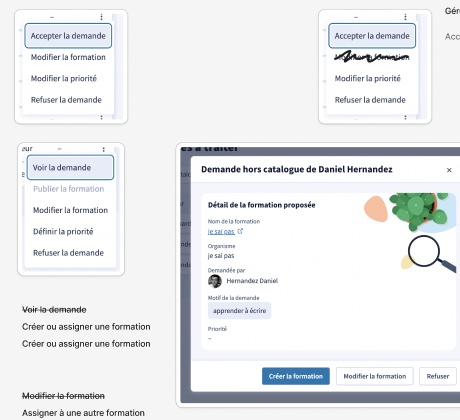
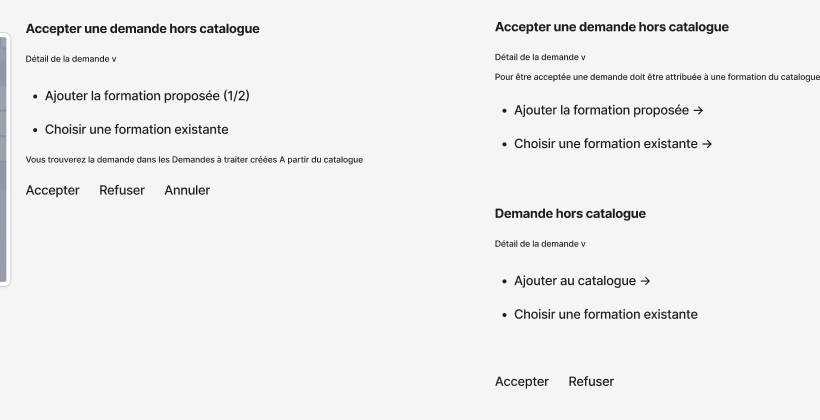
An off-catalogue request comes in. To be accepted, it has to be attached to a course in the catalogue.
- Add the proposed course to the catalogue, then accept.
- Choose an existing course, then accept.
- Refuse.
In every case, the request then lands among the requests to process, like those that come from the catalogue.
Four objects, not two
The product spoke of “requests” and “courses”. What happens in reality fits in four states, and this model is what made it possible to simplify the screens.
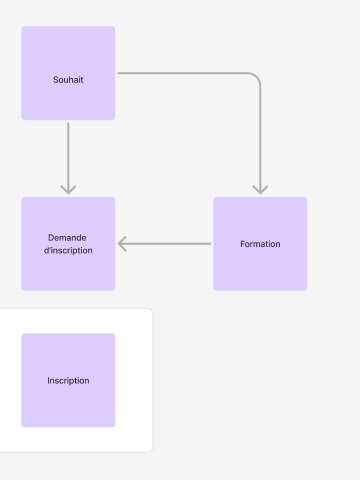
An off-catalogue wish is not a request: it becomes one when a course exists to carry it. Until that link is made, no screen needs to offer “accept”.
The modal removed
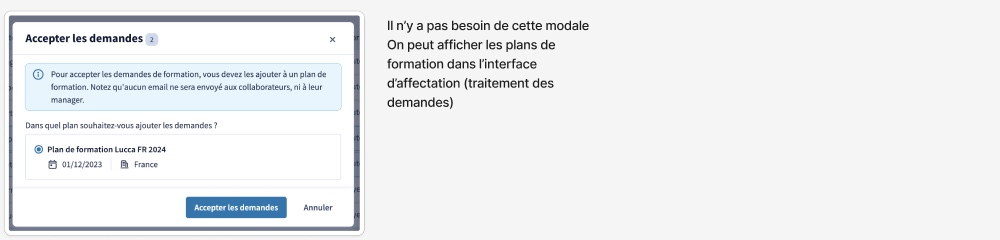
To accept a request, the product opened a window asking which training plan to file it under. The information fits in the assignment screen itself: the window was removed. It is a correction made along the way, on a flow that was already designed, and it is how I work most often: remove before adding.
What remains of it
The final deliverable on the customer side bears another product manager's name: the upstream work is mine, the clean-up is their team's. The screens and data on this page come from Lucca's demo instance.